
This theme is WooCommerce compatible. Here are the instructions you will need to set up shop.
Step 1: Install Plugins
- WooCommerce: eCommerce plugin
- Genesis Connect for WooCommerce: connects Genesis to WooCommerce
* Important: Make sure you install and activate WooCommerce itself and install WooCommerce pages before you install & activate Genesis Connect.
Related: How To Install A Plugin
Step 2: Setting up Shop
1. When you activate WooCommerce, WooCommerce will walk you through a basic set-up and install. Make sure you generate the WooCommerce pages, like shop, cart, etc. The other steps can be completed later. Then, activate Genesis Connect.
2. You can now add in products by going to Products >> Add Product.
IMPORTANT: Although your theme is WooCommerce compatible, we are not affiliated with the WooCommerce plugin in anyway and are unable to provide support for it. If you need additional WooCommerce support, please visit their homepage.
Showing Featured Products on Homepage
Go to Appearance >> Widgets and drag and drop a WooCommerce: Products widget into one of the homepage widget areas, or the sidebar. Configure to match these settings:
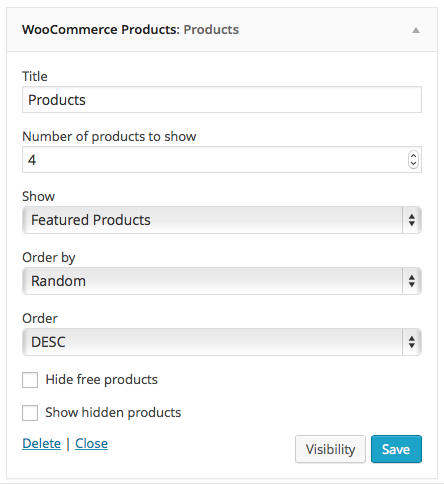
To choose your featured products, go to Products >> Products and select the “star” next to the item you want to feature. Here’s a visual:
