
We’ve included a fun about page template for you, so your page doesn’t have to be presented so boring!
Using the About Page Template
- If you are using WordPress 5.0 or higher with the Gutenberg Editor: you will need to edit this page using the CODE EDITOR, not VISUAL EDITOR. To do this, simply create or edit the page, then select the icon with three dots from the top right corner. Select “CODE EDITOR” and proceed as follows. Click here for a visual.
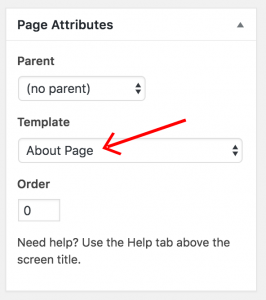
- Create or edit a page. Choose “About Page” for “Template” in the Page Attributes section:
- Paste in this code to the editor box:
[one-half-first class="text"]
<h3>cursive title</h3>
<h4>regular title</h4>
Your info here
[/one-half-first]
[one-half class="picture"]
<div class="photo">upload photo here</div>
[/one-half]
- Change all the areas in red.
Adding The Widget Area
There is a widget area that will appear at the bottom of this page. You can put whatever content you want here, like a message with a call-to-action, a subscribe form, and so on.
- Go to Appearance >> Widgets and add a widget(s) to the About Page Template widget.