We’ve included a fun services page for you to help you beautifully display your information!
Using the Services Page Template
- If you are using WordPress 5.0 or higher with the Gutenberg Editor: you will need to edit this page using the CODE EDITOR, not VISUAL EDITOR. To do this, simply create or edit the page, then select the icon with three dots from the top right corner. Select “CODE EDITOR” and proceed as follows. Click here for a visual.
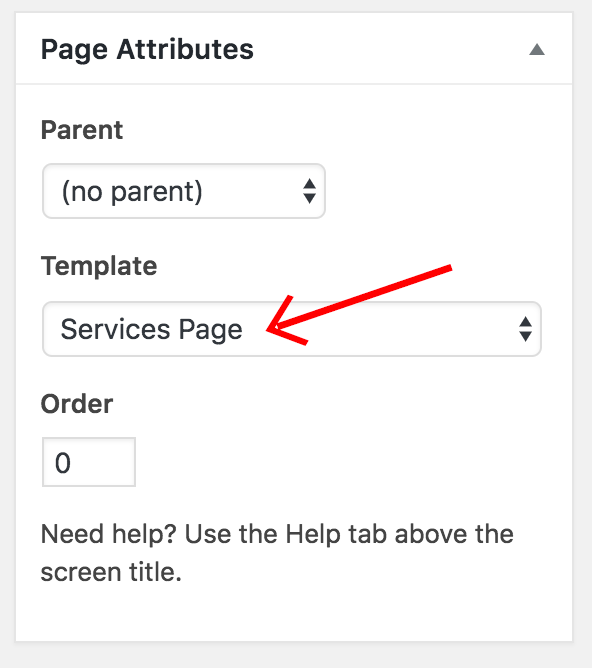
- Create or edit a page. Choose “Services Page” for “Template” in the Page Attributes section:
- Paste in this code:
[one-half-first]
<h3>cursive title here</h3>
<h4>reg title here</h4>
Your info here[/one-half-first]
[one-half class="picture"]your photo here (center aligned)[/one-half]

[clearfix]


[one-third-first class="first-service"]
<h5>Collection #1</h5>
<ul>
 	<li class="left">An amazing feature!</li>
 	<li class="left">Another feature</li>
 	<li class="left">Great feature here</li>
</ul>
[/one-third-first]
[one-third]
<h5>Collection #2</h5>
<ul>
 	<li class="left">An amazing feature!</li>
 	<li class="left">Another feature</li>
 	<li class="left">Great feature here</li>
 	<li class="left">Another item</li>
</ul>
[/one-third]
[one-third class="last-service"]
<h5>Collection #3</h5>
<ul>
  	<li class="left">An amazing feature!</li>
 	<li class="left">Another feature</li>
 	<li class="left">Great feature here</li>
</ul>
[/one-third]
- Change all the areas in red.