
support.dinosaurstew
help & support
Setting Up Your Instagram Feed
*Since September 2019, the old “Social Slider Widget” plugin that we recommended using is not working well for many, due to a change in Instagram’s API.
The developers of the plugin are working on a fix, however, we’re not sure when it will be released.
In the meantime, we recommend using this alternative:
Step 1: Install Smash Balloon Social Photo Feed Plugin
- In your WordPress admin area, go to Plugins >> Add New
- Search for the “Smash Balloon Social Photo Feed” plugin
- Install & activate it
Step 2: Connect Account
You will now see an “Instagram Feed” option in the menu on the left side of your screen. Click on it.
- Click the blue “Connect an Instagram Account” button and connect your account.

Step 3: Customize Your Feed
Once your account is connected, click into the “2. Customize” tab:

You can leave most of the settings as-is, but change these:
Layout Tab:
Number of Photos: 6 (or whichever number you like; an even number looks best)
Number of Columns: same number you use for # of photos
Header:
Show Feed Header: uncheck
Load More Button:
Show the ‘Load More’ button: uncheck
Save changes.
Step 4: Display Your Feed
Once settings are saved, go to the 3rd tab called “Display Your Feed”:

Copy the shortcode that shows. It should look like this:
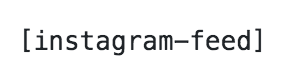
Step 5: Insert Code Into Footer
- Navigate to Appearance >> Widgets
- Locate the old “Instagram Slider” widget. You can delete it, or move it over into the “inactive widgets” section.
- Insert a new Custom HTML widget into the space where the IG Slider was.
- Paste in the shortcode and save.