support.dinosaurstew
help & support
Setting up WooCommerce
If you’ve purchased an upgrade to have your theme be WooCommerce compatible, here are the instructions you’ll need to set up shop.
Plugins
- WooCommerce: eCommerce plugin
- Genesis Connect for WooCommerce: connects Genesis to WooCommerce
Setting up Shop
1. Install and activate the plugins listed under the “plugins” section of this page.
2. Once activated, you will see a message at the top of your screen that asks if you’d like to install WooCommerce pages. Click yes.
3. Before adding products, configure your image settings. Go to WooCommerce >> Settings >> Products and change dimensions to the following:

4. You can now add in products by going to Products >> Add Product.
IMPORTANT: Although your theme is WooCommerce compatible, we are not affiliated with the WooCommerce plugin in anyway and are unable to provide support for it. If you need additional WooCommerce support, please visit their homepage.
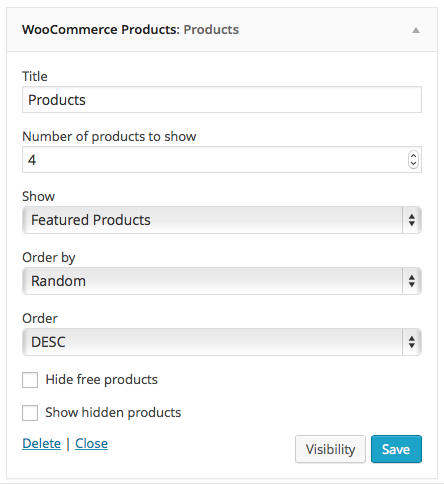
Showing Featured Products on Homepage
Go to Appearance >> Widgets and drag and drop a WooCommerce: Products widget into one of the homepage widget areas. Configure to match these settings: